VidClean

VidClean – Video Cleaner for Android

See which videos and chat media take up space, then pick what to remove.

VidClean shows how much space the videos on your phone take up, where they came from, and which chat media are filling your storage. You pick what to remove.

Coming soon on Google Play How it works

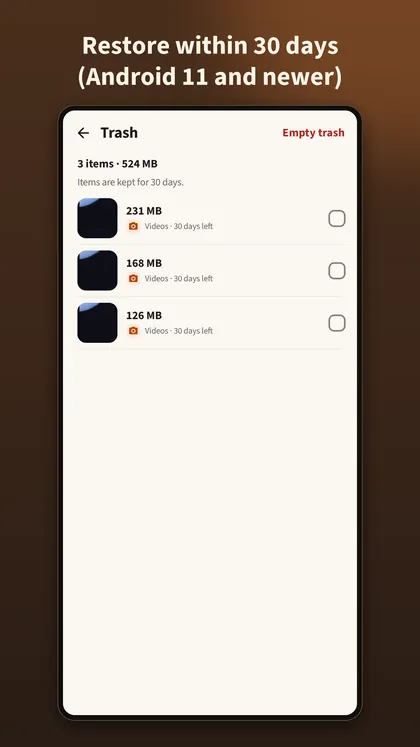
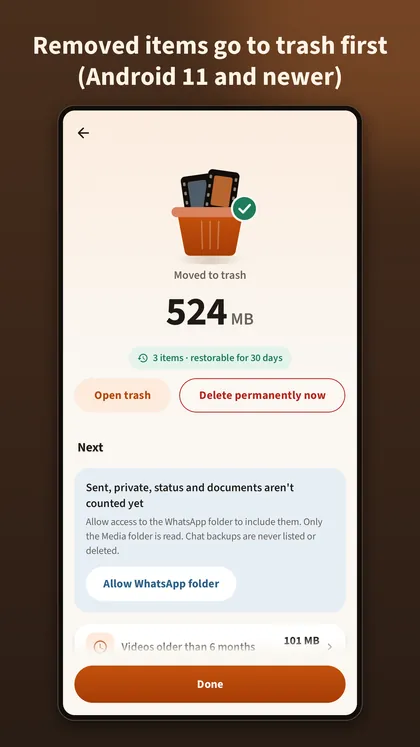
Restore within 30 days: Android 11 and newer. On Android 10 and older, videos and media from your library are deleted directly.

Scanning happens on this phone. Files are never uploaded. That is how this version of VidClean works.

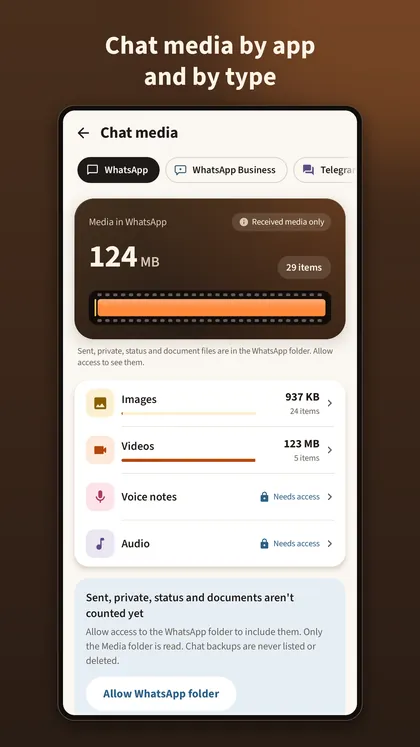
Chat media screen for WhatsApp with received images and videos, and a card to allow the WhatsApp folder.
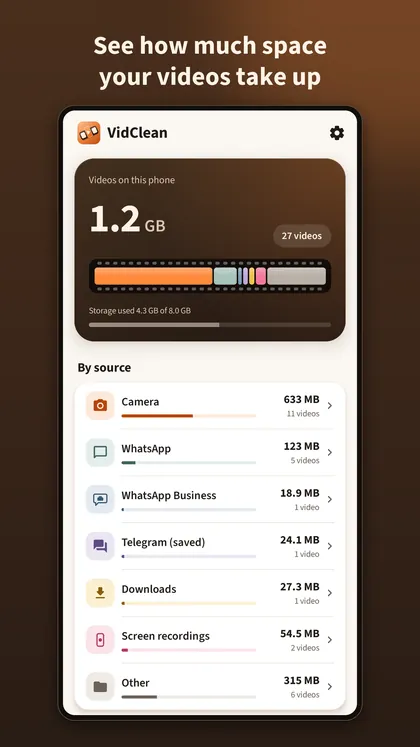
The VidClean home screen: videos on this phone with total size and count, then a list of sources such as camera, WhatsApp and downloads.
The trash screen listing removed items with the days left for each.

How it works

Three steps. You stay in charge of each one.

  1. Home screen with the total size and number of videos on this phone and a by-source list.

    See the numbers

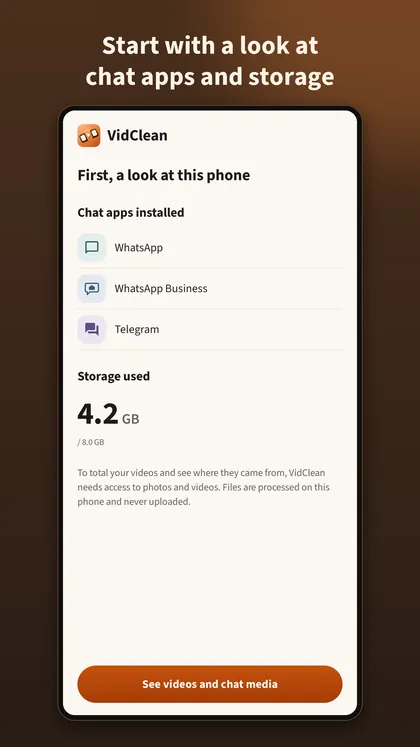
    Start with a look at the chat apps and storage on this phone. Tap the button, allow photos and videos, and the home screen totals your videos and splits them by source.

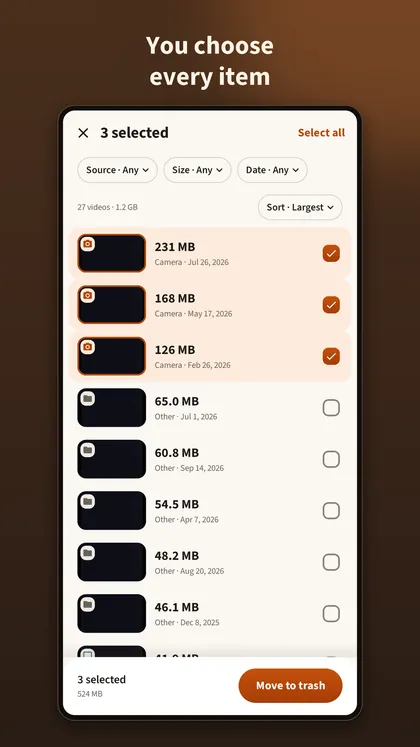
  2. Video list with three videos ticked and a Move to trash button at the bottom.

    Pick what to remove

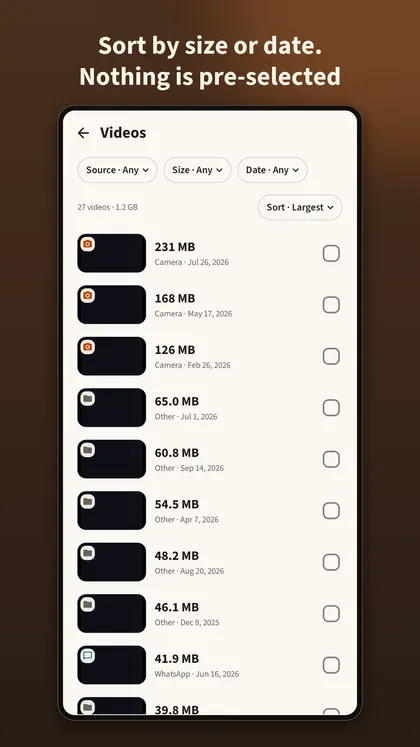
    Filter by source, size or date, sort, and preview. Nothing is selected for you. You choose every item.

  3. Done screen showing items moved to trash, restorable for 30 days, with an option to delete permanently now.

    Trash first

    Removed items go to the trash. Restore them within 30 days on Android 11 and newer, or delete permanently when you are sure.

What it does

VidClean looks at what is on this phone and lets you decide.

Videos first

  • The home screen shows the total size and number of videos on this phone.
  • Grouped by source, such as camera, WhatsApp, WhatsApp Business, downloads and screen recordings.
  • Filter by size or date, sort by largest, oldest or newest, and preview a video before you decide.
  • Nothing is selected for you. You choose every item.

Filters
  • Source
  • Size: 100 MB or more
  • Size: 500 MB or more
  • Size: 1 GB or more
  • Date: older than 1 month
  • Date: older than 6 months
  • Date: older than 1 year
  • Sort: largest
  • Sort: oldest
  • Sort: newest

Chat media by app and type

  • See the images, videos, GIFs, stickers, voice notes and audio that WhatsApp and WhatsApp Business keep on this phone.
  • Without folder access, VidClean counts received media and labels it "Received media only".
  • Only the Media folder is read. Chat backups are never listed or deleted.

Types, listed per app

  • Images
  • Videos
  • GIFs
  • Stickers
  • Voice notes
  • Audio

With folder access (optional)

  • Sent
  • Private
  • Status
  • Documents

Optional deep scan

  • Optional: allow the WhatsApp folder in the Android folder picker to also see sent, private, status and document files, with received and sent shown separately.

A short guide with pictures leads you to the Android folder picker. You can remove the access any time in Settings, and everything else works without it.

Trash first, where Android allows it

What happens to removed items depends on your Android version, and VidClean tells you before you confirm. The details are just below.

  • Items in the trash still take up space. VidClean counts space as released only after you delete them permanently.

Who it is for

Chat-heavy phones

Groups save photos, videos and voice notes automatically. See which chat app and which type of media take up the space.

Lots of videos

Camera clips, screen recordings, downloads. Sort by size or age and preview before you decide.

Phones with little room

Not sure what to remove? Nothing is pre-selected, and removed items wait in the trash first.

When you remove items

Two kinds of trash, and one Android version without a trash.

Android 11 and newerRestore within 30 days
Android 10 and olderDeleted directly, cannot be recovered
System trashOn Android 11 and newer, videos and media you remove go to the system trash and can be restored within 30 days.
VidClean's own trashFiles reachable only through WhatsApp folder access (such as sent, private and status files) go to VidClean's own trash and are kept for 30 days.
No system trashOn Android 10 and older the system has no trash. Videos and media from your library are deleted permanently there, and VidClean tells you before you confirm.

When VidClean asks for permissions

Nothing is asked on the opening screen.

  1. Open the app. A first look shows which chat apps are installed and how much storage is used. No permission box yet.
  2. Tap the button. Only then does Android ask for photos and videos.
  3. Open voice notes or audio. Only then does Android ask for music and audio.
  4. Optional: allow the WhatsApp folder. You choose it yourself in the Android folder picker, and can remove it anytime in Settings.

Permissions, in short

Photos and videos: to total your videos, group them by source and remove the ones you confirm. On Android 14 and newer you can allow selected items only; VidClean then counts just those and says so.

Music and audio: asked only when you open voice notes or audio.

WhatsApp folder: optional, allowed in the Android folder picker, and removable anytime in Settings.

More in the privacy policy and on the support page.

On your phone

This version of VidClean:

  • Scanning happens on this phone. Files are never uploaded.
  • No account and no sign-in.

15 languages

English, Deutsch, Español, Français, Italiano, Português, Русский, 日本語, हिन्दी, Bahasa Indonesia, Bahasa Melayu, ไทย, Tiếng Việt, Filipino, 한국어. Switch anytime in Settings.

Screens

Screens from the app. The numbers were measured on a test phone.

Ready to look?

See what is taking up space on your phone, then decide.

Coming soon on Google Play